
Adding a website to Google



Not everyone knows why it’s important to add their website to Google. The answer is simple: if you don’t add your site to Google, it won’t appear in Google’s search results. This means that people won’t be able to get acquainted with the website’s content or use it to, for example, make a purchase.
So, a logical question arises: what needs to be done to add one’s website to Google. While people enter various queries into the search engine, Google shows specific websites that best respond to those queries.
Below, we’ll explain how Google determines a site’s value and adds it to its index.
Adding a website to Google
The process of adding a website to Google involves the site being indexed by Google. A site that doesn’t go through this process won’t appear in Google’s search result list.
Google regularly scans new websites to find valuable information and adapt it for users. The index is created by Google’s robots, which crawl (GoogleBot) and index each page. Usually, the robots crawl using links, by first checking what links are available (like menus, etc.), to access each subpage and find information.
This relatively simple method is how GoogleBot indexes websites.
There are also sites that can’t pass through this process because bots consider the provided information not valuable. In such cases, the website won’t show up in Google search results.
Adding a site to Google – Don’t block your site from the search engine
The easiest way to add a site to Google is to create your site and wait for Google to find it and add it to the index. Unfortunately, this takes a lot of time, averaging around 30 days from the creation of the internet domain. Currently, this method works everywhere and applies to every website created on the internet.
To avoid waiting 30 days, there are other ways to index your website faster. For example, these methods include Google Submit, the Robots.txt file, Google Search Console, and other Google tools.
See below how to index your site in Google.
Adding a website to Google using submit url
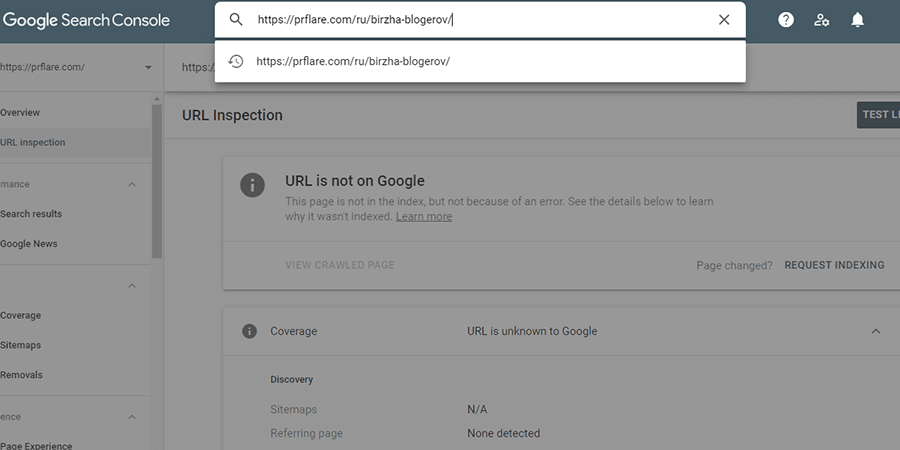
Adding a website to Google using Google Submit URL involves using the Google tool available at www.google.com/webmasters/tools/submit-url. This tool is available to anyone who would like to add their site to Google. All you need is an active Google account, Gmail, or a YouTube account. The site address should be entered in the form and then the form submitted. Google’s response about the acceptance of the site will appear immediately.
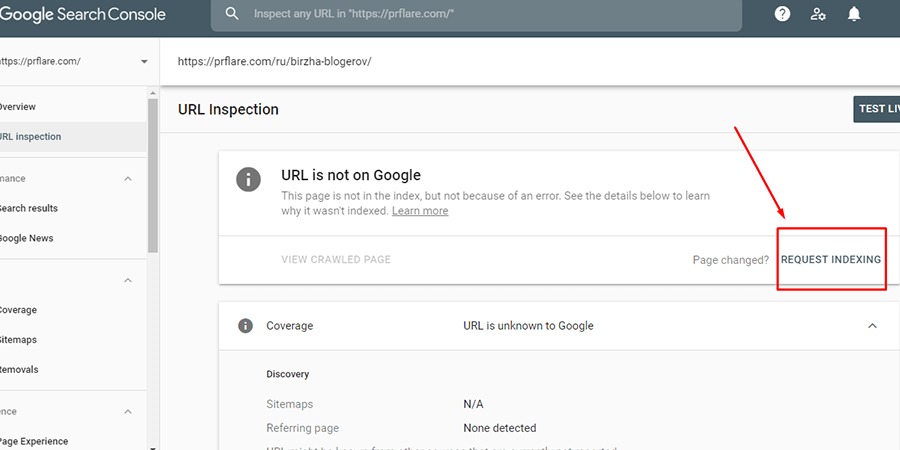
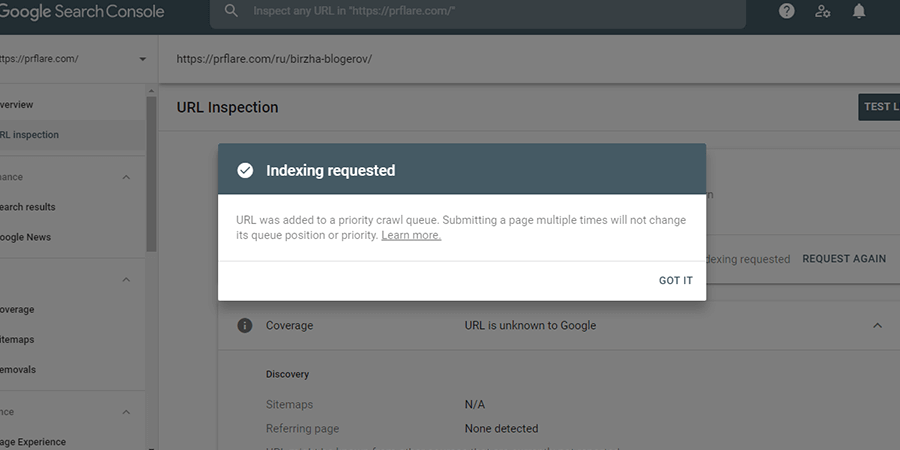
Indexing via Submit URL is almost always positive, it’s rare to get a negative decision.
See further how to index your site using an XML sitemap.
Adding a website to Google’s index via sitemap submission
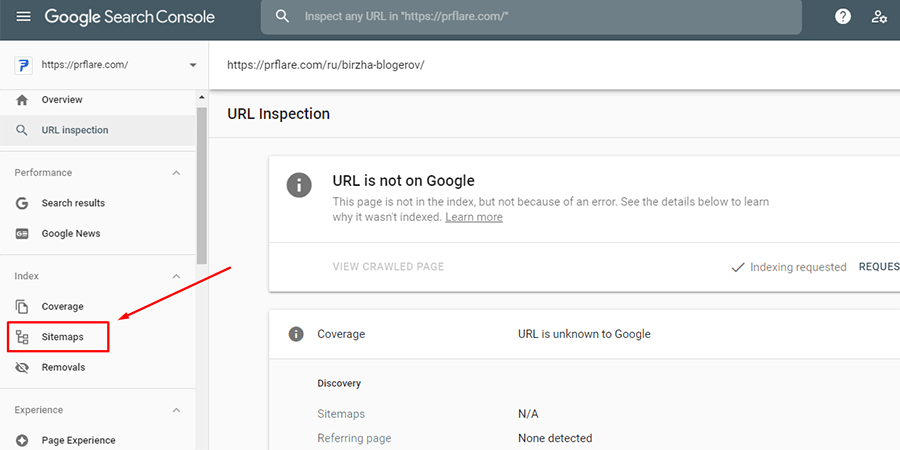
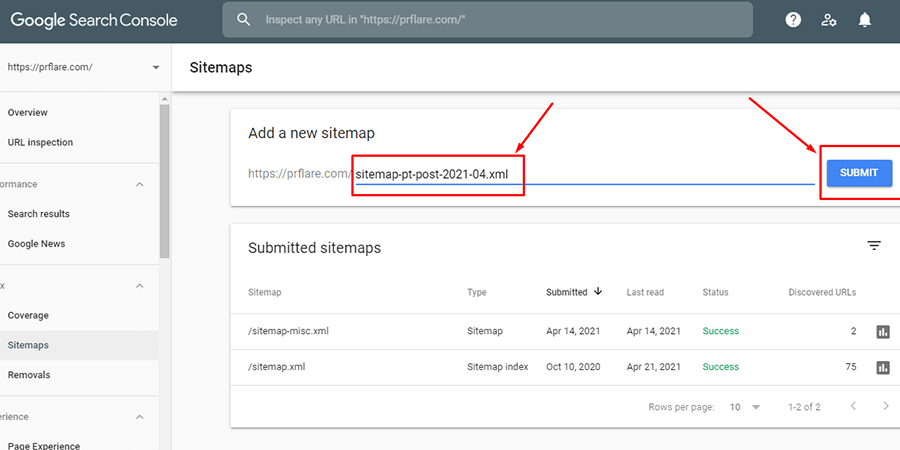
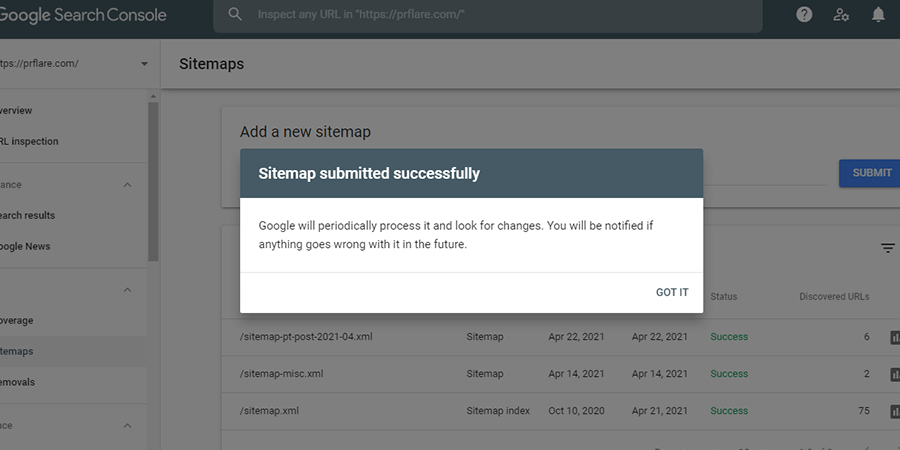
The second method for adding websites to Google’s index is to index them using an XML sitemap. An XML sitemap, or sitemap.xml file, contains the addresses of subpages. This allows all subpage addresses to be reported at once.
How does it work?
- Use the XML Sitemap tool in Google Search Console;
- Insert an instruction about the XML file in the robots.txt file, for example, “Sitemap: https://prflare.com/sitemap.xml”.
Besides the XML Sitemap, you can index a site using the robots.txt file. In this case, you need to write in the file which web pages are to be indexed and which are not. This file should be located at, for instance, www.prflare.com/robots.txt.
Create backlinks for your site

Another popular and effective way to index your site is backlinks. To manage backlink acquisition, you need to find sites online where you can place links leading to your site.
Acquiring backlinks or link-building is about creating backlinks that will influence your site’s quality. Ideally, satisfied users will link to your site. Building a backlink base takes a lot of time and understanding of how to build a diverse backlink base. Experts say that quality backlinks can be the following:
- sponsored articles
- guest posts
- link exchanges
- directory submissions
- comments on forums and blogs
Wait until Google visits your site
Once a website is created, you have to wait until it appears in Google’s index. When it appears in the index depends on many factors. Large and small websites may be visited by Google just a few times a month.
Adding a site to Google can take from a few hours to a few months. Valuable articles, XML sitemap, filled robots.txt, backlinks… all work and help the bots visit the site and begin indexing.
For a website to be indexed and have a strong position in a search engine, it’s better to focus on content quality. Attention should be paid to the target group, the quality of information, rather than Google’s bots.
Also, if there’s no time to implement all practices we’ve described, the best solution would be to contact promotion specialists, such as those at PrFlare. Our specialists can help create an effective promotion strategy, making the site more popular online.
How to check if a site is indexed by Googlebots?
There are several ways to check the indexing status of websites by Googlebots. All doubts can be resolved.
But how to check if a site is indexed. Here are a few methods.
site:yourdomainname.pl
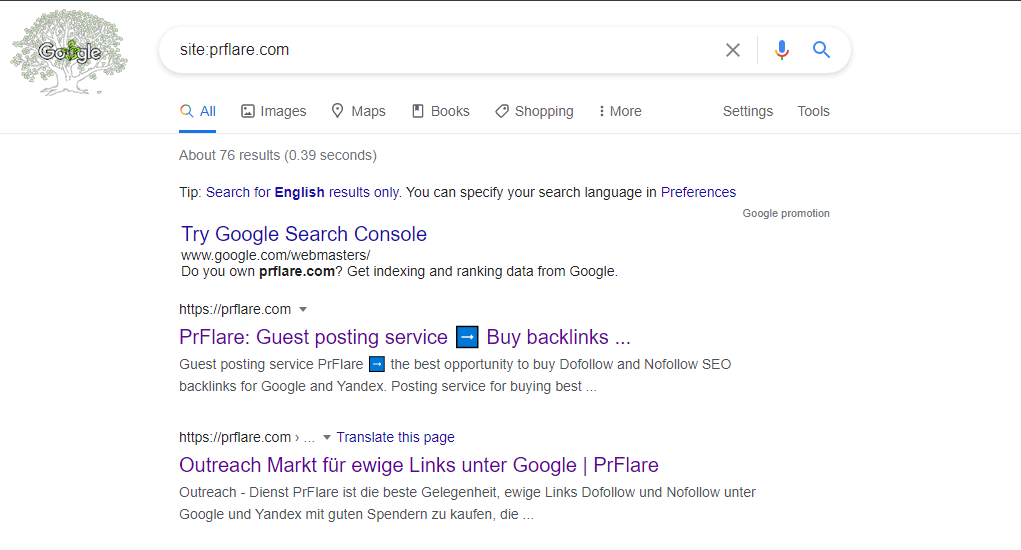
This is the fastest and also free method to check how many subpages are indexed in Google. Just enter into the search engine, the combination “site:” + “domain name”.
If the site address appears in search results, it means the website is in the index.
“Indexing Status” in Google Search Console
To be sure how a site is indexed, you can check the “Indexing Status” available in the Google Search Console panel.
This report is available after logging into your Google account. The report also contains errors related to indexing pages.
Among the errors, you can find information like:
- number of URLs indexed by bots
- number of blocked URLs
- number of errors (server connectivity, robots.txt file download errors, DNS server issues)
- as well as drops or increases in the number of indexed URLs
Adding your business to Google Maps

If you need to use Google Maps for your site’s promotion, here is a short instruction on how to use it.
So to display your website on Google Maps, you need to do as follows:
- Open Google Maps and right-click on the spot where your business is located.
- In the displayed menu, choose the “Add your site” option.
- After this action, you will be redirected to the Google My Business page, where you can start adding your site to Google Maps.
- In Google My Business, fill in information about your business – name, consent to general location, exact business address, choose a category that best describes your business, contact details.
- Finally, Google will ask for business verification. Verification will be completed by phone, postcard, or email. You need to choose one of the methods.
- Once verification is complete, the business will be visible in Google Maps. Then users can easily find the business using Google Maps.
Adding a site to Google Analytics
Analytical data is a true treasure trove of knowledge about a website, traffic, and URLs. Google Analytics helps foremost to know what users do on the site and how exactly they receive the given information.
To have this analysis, you need to add your site to Google Analytics, by inserting the Google Analytics tracking code. Here we’ve prepared instructions on how to do this:
- create a Google Analytics account, where you provide the website address, time zone
- download tracking code from the Administrator panel of Google Analytics
- then paste this code into the needed page section of the website
- after insertion, the code starts to live and collect site data
Adding a site to Google News
As in search results, Google uses a special algorithm for Google News. Based on this algorithm, you can post entries in the search engine that will also optimize website ranking.
How to add a website to Google News?
To add a site to Google News, you need to have a Google account. Then, go to the News-Tools section and log in. The easiest way to add a site to Google News is through Google Webmaster, where a list of sites will be displayed on the homepage. To add one of them to Google News, click next to the site’s name: “Submit request to add to Google News index”.
Remember that a site must be optimized to be added to Google News. Among the requirements are general (the site must have a press character), technical (the site must be standardized), and quality (articles related to important news).