
All About the rel=canonical Tag and How to Apply It



A comprehensive overview of the rel = “canonical” tag – its purpose, methods of application, and issues encountered by optimizers. A study of the necessary information for effective work on canonical tags. The data presented below is intended for individuals who are just beginning to explore this topic.
Rel canonical – key concepts and areas of application
Using the same content on multiple pages can lead to serious penalties from search engines. However, in some situations, such use of text may be justified:
- using the site with and without www;
- inclusion of one page in two or more categories simultaneously;
- filtering and selection of products by attributes in a catalog.
Considering the last example, most often the pages are partially identical. One might have a filter activated by type of product, and another by its cost. However, this doesn’t add uniqueness.
To avoid penalties, it’s important to determine which version will be considered primary or canonical, and which will be a duplicate. In programming, a special tag with the same name – rel = “canonical” – was created for this purpose. It helps prevent penalties due to duplicate content.
The canonical page has the main URL. Other pages, where the same content is used, are marked with rel = “canonical”. This allows the bot to recognize the duplicate page.
Why specify the primary version?
rel = “canonical” – this is an essential attribute that should be added to duplicate pages. This requirement not only helps eliminate the risk of penalties but also aids in:
- reducing unnecessary expenses, as you can lower the proportion of the crawling budget allocated to duplicates;
- signaling the URL that will not only appear in search results but also receive all signals;
- distributing link equity to the necessary page or site.
You can study the data on canonical URLs in more detail through two servers – Yandex and Google. The information is displayed in the help tab.
For greater clarity, it’s necessary to examine the concepts with an example. Let’s provide one. A site has a page that can be accessed through three different addresses, including:
- https://my-website.com/blog/categories/144;
- https://my-website.com/blog/categories/photo;
- https://my-website.com/blog/categories/news.
If it’s necessary for https://my-website.com/blog/categories/photo to be considered the canonical page, it shouldn’t be replaced. Meanwhile, the duplicates’ code must include – . This step will result in only one of the three links being ranked in the search results – https://mywebsite.com/blog/categories/photo.
Index and Non-Canonical Pages
Yandex experts confirm that there is a chance that non-canonical pages will appear in search results. However, this can only happen in a few cases:
- high level of relevance;
- the difference in content between a non-canonical page and a canonical page.
Meanwhile, Webmaster now features new designations of pages that allow users to view the desired type. For example, if you need to study canonical pages, you should find the line with the corresponding canonical label in the “Pages in search” column.
Google specialists hold a similar opinion. According to them, the system is not always able to recognize only canonical pages. This is because the canonical tag is not a directive but is considered a recommendation. Therefore, if the system recognizes a non-canonical URL as more relevant, it will display that in search results. However, using the canonical attribute reduces the likelihood that the system will recognize the wrong page URL.
Note! Despite these features, canonical pages have priority in search results. However, incorrect tag configuration can lead to indexing problems. Therefore, it’s important to understand the circumstances under which the use of such a tag is strictly necessary.
Situations where the presence of a canonical tag is mandatory
The main reason for the presence of a canonical tag is the existence of identical information on multiple pages. In other words, the same content is served by several URLs simultaneously. In such duplicates, a canonical tag should be added.
Creating page duplicates
Duplicate pages with similar content are most commonly found on online store resources. There, it is possible to sort products by a specific criterion. We can examine the situation using a furniture store as an example.
- Example number one. If a chair in the assortment is available in several colors, you can use a tag to highlight the model (its page) that is most popular among customers. Meanwhile, users will have access to all products. Only the link to the selected color will have link juice and other signals.
- Another situation is when a product page can belong to several categories at once. As a result, multiple URLs appear that relate to a single product. In this case, it is necessary to choose one page that is in high demand. It is this page that is added to the code of the duplicate page. This is done by using the canonical tag rel = “canonical”.
Pagination Pages
When switching pages, duplicate URLs are created. Indexing errors often occur due to problems in determining the main page. This happens because the choice simply falls on the very first page. Let’s consider several options.
- First example. If there is an option “View All,” then all the information listed on it will belong to the canonical page. To do this, place rel = “canonical” in the Pagination page’s code.
- For http://my-site.com/blog/categories/photo-2, the URL is required – <link rel=”canonical” href=”http://my-site.com/blog/categories/photo-2/show-all”>.
- Example two. If the “View all” option is not available, then a canonical type is added to all pages.
- For http://mysite.com/blog/categories/photo-2, the canonical will be <link rel=”canonical” href=”http://blog/categories/photo-2″>.
- Example three. Some experts believe that specifying a canonical to itself will result in all pagination pages displaying in search results. However, this is only acceptable in situations where identical descriptions and titles on pages with different content are acceptable. It is recommended to restrict pagination pages for this purpose. Use follow or noindex. Disallow should be used in the robots file. This will limit indexing but allow following links.
However, it’s important to remember that noindex is compatible only with Yandex; this option is not suitable for Google.
One site and possible addresses
Addresses are determined based on the type of site:
- https://mysite.com/;
- https://www.mysite.com/;
- http://mysite.com/;
- http://www.mysite.com/.
However, for the search engine, this will not be one resource but three separate ones. To correct this, you need to add a canonical. This will help avoid issues with scanning and indexing, and also set a 301 redirect to the main version of the site.
Mobile-optimized URL
Google has changed its search policy by making mobile versions of websites the main focus. This system is called Mobile-First Indexing. To understand the main conditions where the use of the canonical tag is necessary, it is essential to study the opinion of Google’s leading expert – John Mueller.
If there is a mobile version m.nature.ru, you should add a tag to link to the desktop page – rel = “canonical”. For the desktop, use rel=alternate. If all conditions are met correctly, the bot will recognize the mobile version as canonical or primary. It does not matter that there is a desktop version in the code. These settings are not subject to change if they are applied in Sitemap.xml.
Country URL
Often websites are created with multiple URLs to cover many countries at once, while they have the same content in one language. In such cases, you should not only select a canonical page but also ensure the presence of references to all duplicates.
However, if different languages are used on each URL, hreflang should be used. Then the search engine will be able to show separate results.
Note! The hreflang tag should only be used if it is necessary to specify additional pages with identical information. However, they are conducted in another language or for a separate region.
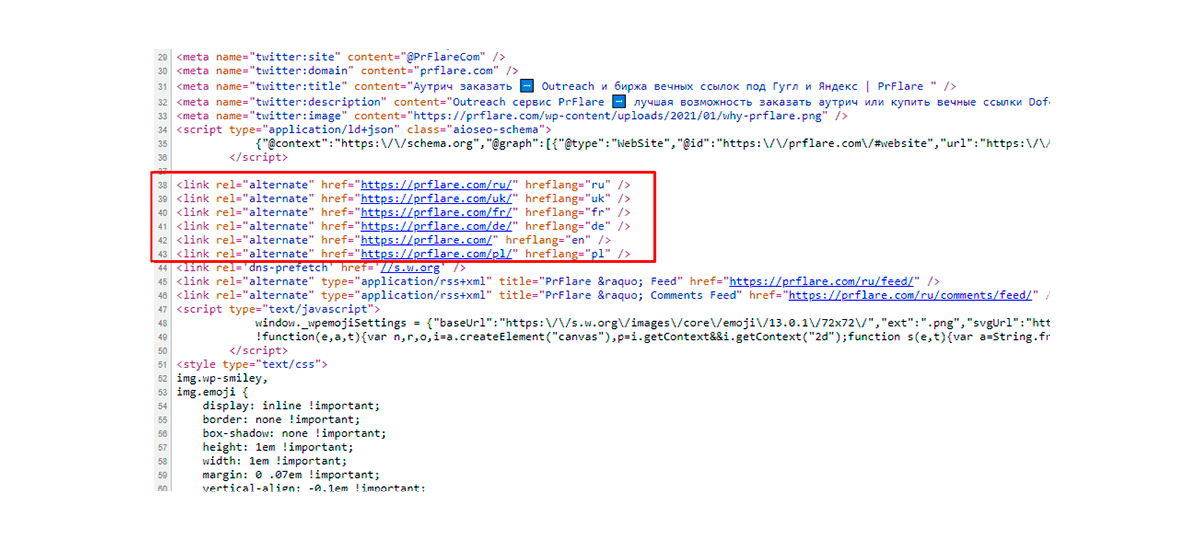
Google’s shift towards mobile-oriented systems has made creating proper hreflang settings mandatory. These include the main rule – mobile tags for mobile URLs and desktop tags for desktop URLs.
Registers
If addresses are marked in different cases, the search engine may recognize them as different. It is necessary to use lowercase. This will help confirm the identity of the links.
Ways to effectively set up canonical
To configure, it is necessary to highlight the page among the duplicates, which will be considered the main or canonical one. It is then entered into an attribute. For example, <link rel=”canonical” href=”http://mywebsite.com/blog/categories/photo-2/”>. This attribute is added to duplicate pages. There are several options, each with its own features and advantages.
Using a CMS plugin
For automating canonical parameters, unique functionality or plugins in CMS are used. For clarity, let’s consider a few examples:
- Yoast SEO plugin. Allows adjusting canonical pages on WordPress.
- Joomla plugin. The SEF function is available, which automatically adds a rel = “canonical” tag. At the same time, the main page with a user-friendly URL is specified.
- OpenCart plugin. Sets SEO URLs by selecting products based on parameters.
Besides the listed ones, there are other options. In practice, we will examine the most common option for CMS – WordPress.
WordPress – main configuration parameters
To automatically add a canonical, the Yoast SEO plugin is required. All setting parameters are displayed in the “Advanced” section. In the English version – “Advanced.” The main action is entering the main URL of the page. After that, the plugin adds nofollow or noindex to the page. At the same time, canonical is set to avoid further issues in the site output.
There are other methods if the presented option is not suitable.
Using an HTML Page
This option involves adding a rel = “canonical” tag to the <head> section of a duplicate page. Visually, it looks like this:
- For https://mysite.com/*utm_content, the canonical link will be https://mysite.com/. Then you need to enter <link rel=”canonical” href=”http://mysite.com/”> on the resource https://mysite.com/*utm_content.
HTTP for Header
The option presented above is not always feasible to implement in practice, especially in the absence of <head>. Therefore, it is recommended to gain access to the server settings. After that, you can add to HTTP via PHP or .htaccess.
If a duplicate file request is made, the server should display the main version.
Consider this example: Information was compiled in the form of a guide, and for user convenience, it can be downloaded from the blog. The file type is PDF. The result will be:
- Content-Type: application/pdf
- Link: <http://mysite.com/blog/canonical-tags/>; rel=”canonical”
This algorithm can be applied when working with other pages.
Sitemap
Any search engine with default settings analyzes the links in the XML file as canonical. Some services, like Google, make it mandatory to apply only canonical links in the sitemap. However, this element acts merely as a list of recommendations. Some search engines do not take it into account.
Using 301 (redirect)
Another way to solve the problem is by using a 301 redirect. This is suitable when the site can be accessed through multiple addresses, including:
- https://mysite.com/;
- https://www.mysite.com/;
- http://mysite.com/;
- http://www.mysite.com/.
The first option is marked as canonical, and redirects are configured for the others.
Using links as an addition
According to John Mueller, certain signals are needed to determine the canonical address. Search engines use these signals. For example, if there are two address options https://mysite.com/ and http://www.mysite.com/, Google will choose the first. However, often it prefers a more attractive address. If only one canonical link is displayed, the system may select another, deemed more optimal.
If the settings are defined incorrectly, this will cause serious issues during indexing. In such situations, optimizers can make several mistakes in their work.
Issues in canonical settings
- The one-page rule
- The main rule for effective setup is that 1 page corresponds to a single canonical address. If this rule is not followed and multiple are created, there is a risk of the page being ignored by the search engine. Therefore, it is important to check the correctness of canonical settings. To do this, you need to carefully examine the CMS plugin implementation.
- One page – different canonical URLs
- Despite the similar interpretation to the previous point, the essence here is different. It explains that when using several methods to specify the canonical, you need to ensure that the homepage link is consistent among them.
- Sequence of canonical pages – main settings
- If a different main page is specified as canonical for one main page, the search engine will not consider that canonical address. For example, for mysite.com/1, there is a canonical link mysite.com/2, and for it, mysite.com/3.
Placement of rel = “canonical”
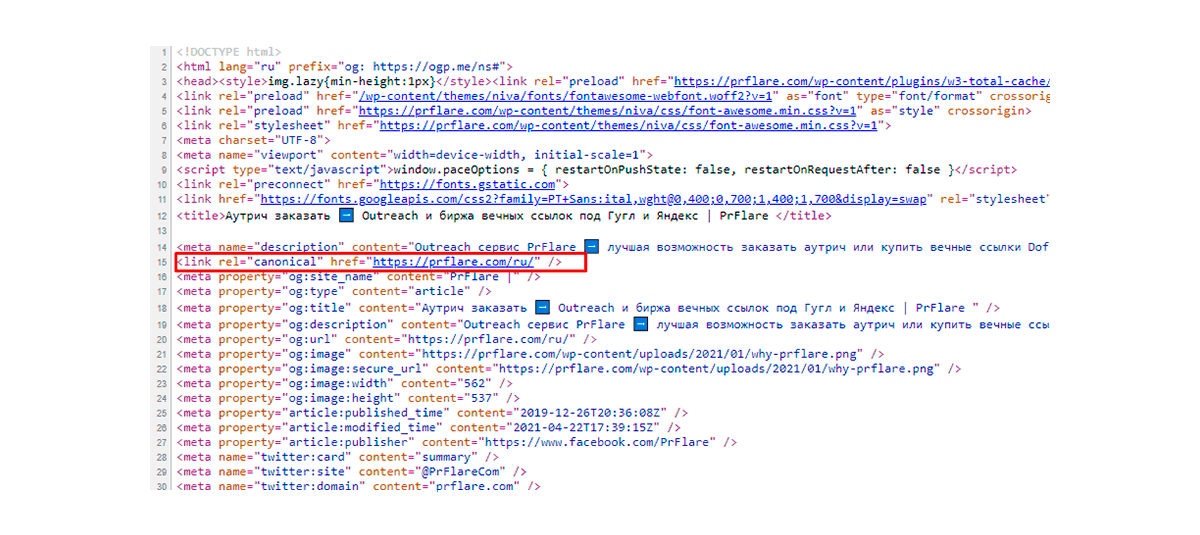
The rel = “canonical” tag should only be placed in the head. If it is placed in other areas, the search bot will not consider them. There is a risk that the entire page will be ignored.
The first page of pagination – canonical
If of all the pagination pages only the first one is designated as canonical, then the indexing of the rest will be excluded. The article presents several options to rectify the situation. One popular option is to assign the page with the ‘Show all’ feature as canonical. The second option is to specify an individual canonical for each page.
However, there is a possibility to exclude the use of the canonical tag and cease indexing. The redirect will still be available. To achieve this, you need to:
- Use disallow for /photo.
- Apply noindex or follow for pagination.
This configuration method is used in situations where there is a risk of negative outcomes due to the use of all Pagination pages in the issuance with identical Description and Title.
Canonical URL – an alternative to 301 redirect
Even though the function of a 301 redirect and a canonical tag can be said to be identical, it is not recommended to interchange them. The first is aimed at directing traffic to a single page, while the second hides from indexing. However, using rel = “canonical” will not limit obtaining traffic or activity.
The main page acts as canonical
It is not recommended to configure the canonical link in such a way that it becomes the main one for the site. This will result in search bots ignoring all other pages, focusing on the homepage.
Consequences of hiding the canonical page from indexing
If the preferred page is not indexed, it cannot participate in forming search results. The same result will occur if there are other reasons for search engine restrictions. In such circumstances, a non-canonical page will be chosen.
Ways to check canonical
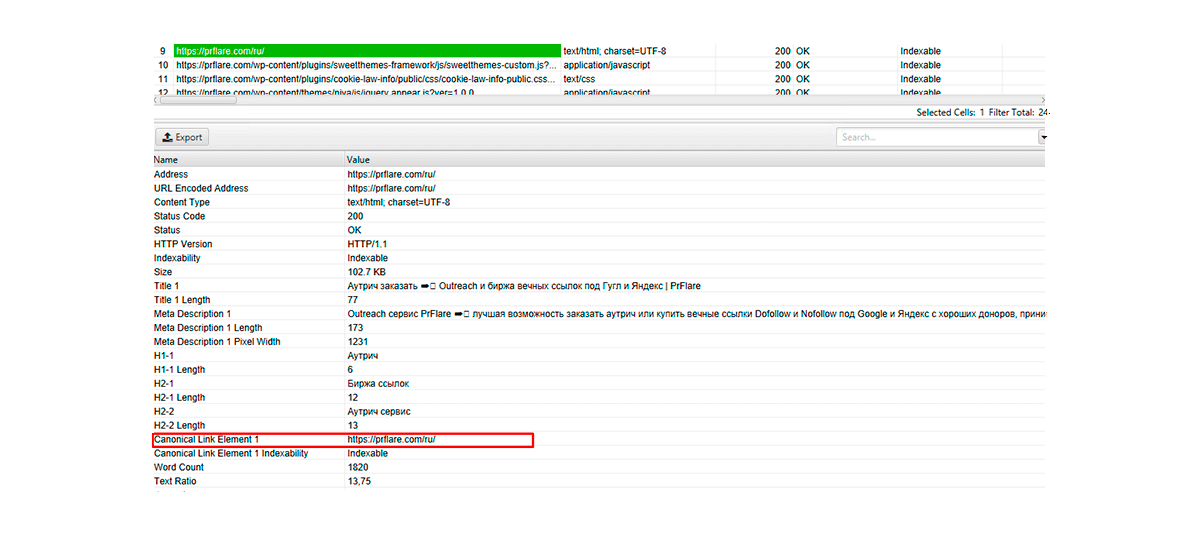
To check if the canonical page setup was done correctly, you can use the desktop program Screaming Frog SEO Spider. It will highlight the page that Google recognizes as the primary one.
For Yandex, the verification path is different. Webmaster will be suitable for such purposes. It will remove all duplicates from the search, leaving only the canonical link. This information can be found in the ‘Indexing’ section. All excluded pages are displayed in the section of the same name.
Our Opinion
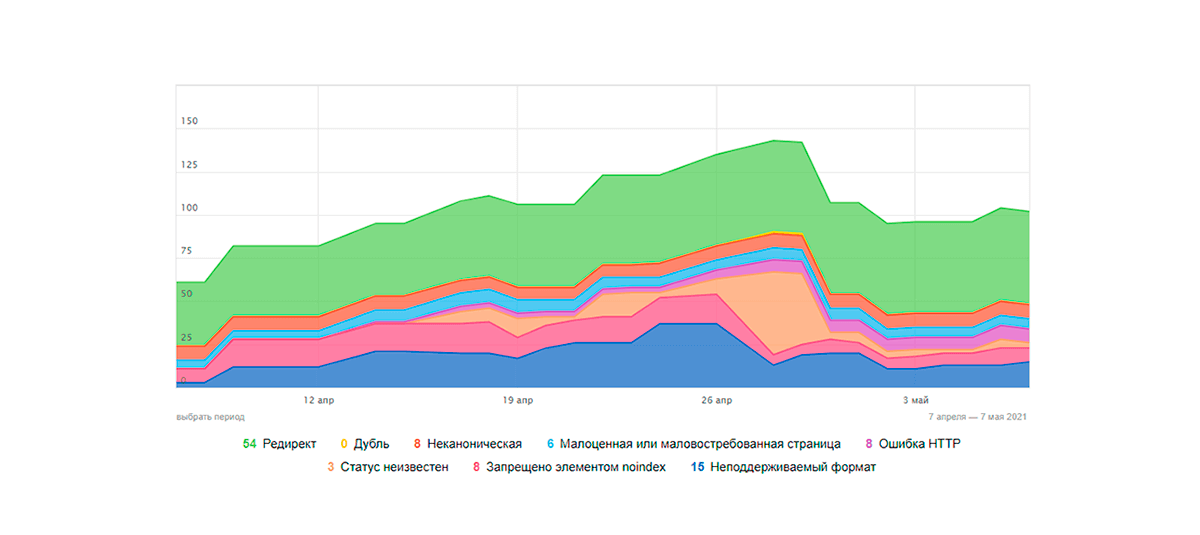
The examples above demonstrate the importance of canonical attributes. If anyone still doubts whether canonical addresses work, the case mentioned above should dispel their doubts. If you have anything to add on the topic discussed, we invite you to share your experience with canonical implementation in practice in the comments.