
The Essence of Pagination, Why It Is Needed, and How to Set It Up Correctly



Pagination is the division of a large array of data on a specific resource for the sequential display of content. In simple terms, it is a numbering of pages on a web resource in ascending order, designed for user convenience. It is especially relevant to split a resource into pages for marketplaces, online stores with a large assortment of goods, sites that provide various services to the public, portals where up-to-date news is posted, popular blogs, and more.
Through numbering, users find it easier to navigate between groups of links. Page numbering can be seen at the top or bottom of the site.
The Impact of Pagination on Search Engine Optimization (SEO)
Segmenting a large array of data into clusters turns the site into a more understandable and user-friendly resource, improving the usability of the resource. Furthermore, the inclusion of valuable page content in search engine indexes depends on properly configured pagination. Collecting, processing, and entering information about the content of the resource into search engine databases, as well as its ergonomics, significantly affect its inclusion in search results. Let’s cover this in more detail.
Website Usability
Search engines want the most valuable and useful content to be displayed in the top results. For this, automated systems use a large number of indicators that allow evaluating the convenience of a site for users, as well as the quality of content placed on the site. How users behave on the site and how convenient the platform is for them are also linked to pagination. Let’s focus on this in more detail.
Page Experience
When pages load on the site gradually, it helps reduce the amount of information the server sends to the browser. Thanks to this, on smartphones and computers, the site loads faster. Additionally, the ease of use of the pages is a ranking criterion that increases the URL’s positions in search results.
Behavioral Factors
The time users spend on a site is an indirect indicator of the presence of quality content. Pagination facilitates the visitor in spending more time on this site. An analysis of search results has shown a close connection between user behavior and positions on queries.
Crawling and Indexing
For pagination pages to appear in search results, you need to know some features that indexing of pages by bots depends on:
- Unique content.
Since Google and Yandex might remove a page from the index if duplicate content is detected, the site owner should primarily post original content on their site. Numbered pages are perceived by robots as separate URLs. However, since pagination pages often resemble each other, one should not forget about their optimization. Otherwise, the robot may perceive them as duplicates.
- Crawling budget.
Googlebot is unable to scan all the pages of the resource it visits. It has a limited number of pages per visit. While bypassing large sites with many numbered pages, it might simply lack the limit to scan other valuable URLs. In such conditions, their content is indexed over time.
SEO Pagination Strategies
There are several approaches to instruct robots not to consider pagination pages as duplicates. Let’s talk about a few such strategies.
Indexing All Numbered Pages and Their Content
In this approach, all pages are optimized, fulfilling search engine conditions: unique content is added to them, and configuration between unified resource indicators is set for web crawlers.
Specifics: numbered pages and URLs added to them are indexed and sorted in site’s output. The strategy is relevant both for small and large pagination chains.
Indexing a Single Unified Summary Page
The strategy is based on creating a new URL that includes all the category results that are paginated. Users will find this page by link or clicking on “View All.” As a result, to add content for indexing, the bot needs to process only one URL.
Sometimes it happens that the search engine considers a match on numbered pages and “View All” as duplicates. To avoid this, a canonical tag is applied. On all numbered pages, you should add canonical to the main filter page. So, the web crawler will understand which content among duplicates should be indexed first.
Specifics: this method is relevant for small categories, for example, when results of 3-4 numbered pages are displayed. For a large pagination chain, this method will not bring noticeable results, as if a lot of content is loaded on one page, this significantly affects its speed.
Closing Numbered Pages from Indexing
With the help of closing pagination pages in the robots.txt file, bots are prohibited from indexing all pages except the 1st one. This approach allows saving the crawling budget to bypass other important URLs. Also, with this method, you can easily hide page copies.
Specifics: this approach is suitable for large resources where content is displayed in stages. The downside of the method is that if the bot does not find links on pagination pages, it might not index the pages they redirect to. This particularly affects cases where these URLs are not marked on the resource map (Sitemap).
Pagination Errors and Ways to Detect Them
Such shortcomings are timely identified if you use specific tools. Let’s discuss them in more detail.
Duplicate title and description tags
Completed description and title are one step towards SEO-optimization. Compacted data about the web page is visible to ordinary users in search output, as well as to robots conducting scanning. The recommendation of search engines is to prescribe unique title and description tags to all site pages.
Duplicate Content
Robots, comparing the pages of the resource, notice URLs with non-unique content. When Google or Yandex detect duplicates, they remove these URLs from indexing. Therefore, the site owner should timely track and eliminate duplicates, thereby optimizing their site.
Incorrect Setup of Canonical Links
Canonical is needed to redirect bots to a unified site indicator prioritized for indexing. On duplicates/similar pages, rel=”canonical” is indicated, redirecting to the canonical version.
With incorrect canonical setup, robots might not take valuable URLs into account and remove pagination pages from the index, considering them duplicates.
Special Tools for Identifying Pagination Issues
There are several services designed to find errors related to resource search optimization, which also include pagination. Let’s take a closer look at some of them.
Google Search Console
If you go to the “Indexing” section and then open the “Pages” tab, you can see URLs that have been removed from the index. You can also see resource pages here that search engines considered duplicates (such pages will be assigned the status “Page is a copy”).
Besides this, in Google Search Console, you can view information about canonical issues.

Yandex.Webmaster
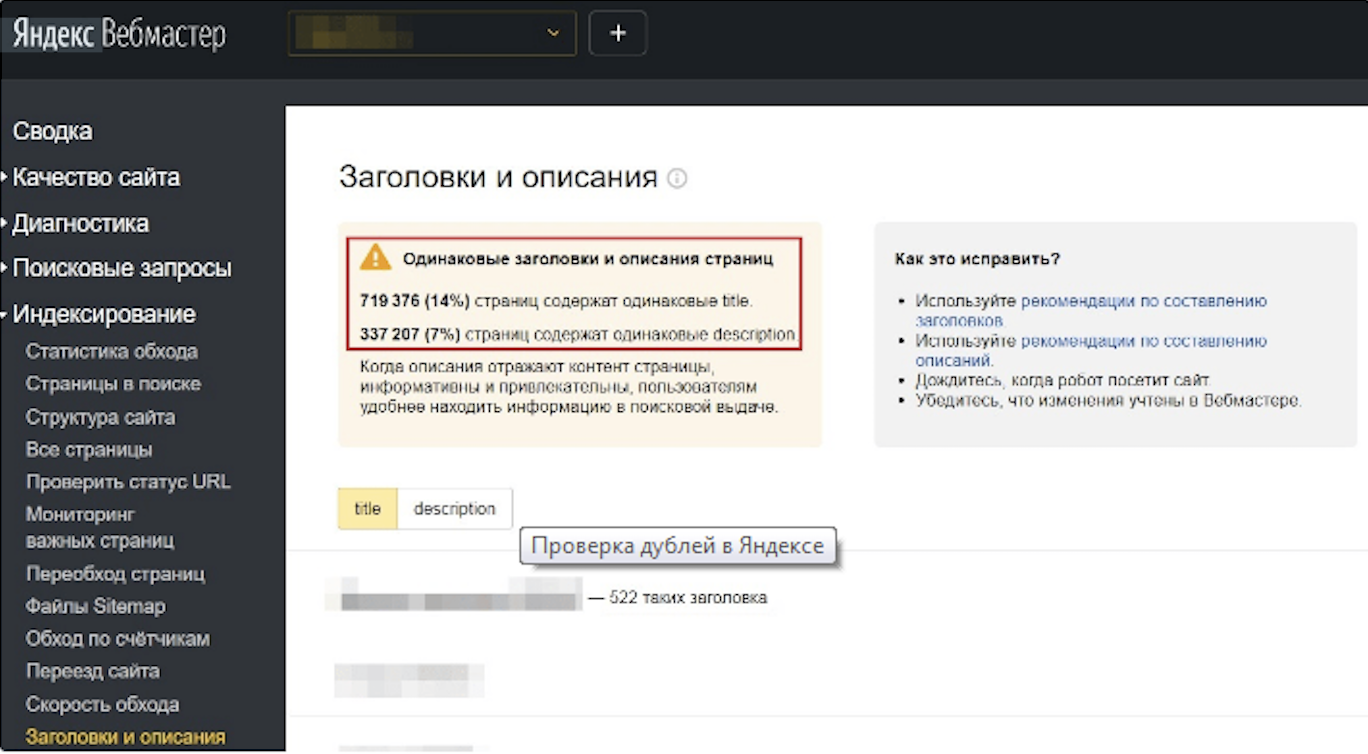
Using this service, you can see which pages the Yandex robot considered duplicates, find copies of titles and descriptions. Users can discover URLs excluded from the index by visiting the “Indexing” section. A web page is assigned the status “Duplicate” if web crawlers found non-unique content there. Duplicates of titles and descriptions can also be seen here by clicking on the “Headings and Descriptions” tab.
Programs for Detailed Audits
Special tools exist which, when applied, allow conducting a detailed audit of the site, including various technical parameters. Such tools include Screaming Frog, which can check a large number of parameters and provide means for solving problems. This program identifies many issues: duplicate titles and descriptions, canonical issues, and others.
Setting Up Pagination
For this, the following steps should be performed:
Task 1. Indexing All Pagination Pages
Optimization is important for the successful indexing of pages by search engines. It is necessary for pages to have different URLs, content, title tags, and description.
To optimize the pagination page, you should perform the following:
- Develop numbered pages with original addresses.
For this purpose, apply nesting of unified resource identifiers based on url/n or query parameters ?page=n. Here n will denote the sequential page number.
Forget about the pagination ID #: Google cannot recognize data coming after them. This means that robots might consider the URL-address already processed and not index it.
- Link pagination pages together.
Using a href, specify in the code of each of the pages a link to the next URL. This will make it easier for bots to scan the partitioned content. Be sure to also include a link to the 1st page. This creates a hint for the bots on which page to choose during ranking processes.
- Create titles and descriptions for pages.
Even though Google allows using identical titles and descriptions during pagination, the titles and descriptions still need to be completed to make the page content unique.
- Assign each pagination page canonical.
For this, in the tag specify the canonical attribute and the link pointing to this page.
Task 2. Indexing a Single Overall “View All” Page.
With this approach, it’s possible to effectively optimize “View All” with pagination results for display in search results and to occupy higher positions. For this, it is necessary:
- Create a page that includes all pagination page results.
Web resources can have several such pages. This depends on how many numbered blocks are placed on the site.
- Indicate “View all” as canonical.
Ensure that every pagination page in the tag writes the canonical property. Considering this, robots will move to the general URL, which is prioritized for indexing.
- Optimize so “View all” loads faster.
The faster content is displayed on PCs, smartphones, and other devices, the greater the likelihood that a URL will receive better positions in the output. Using various services, for example, PageSpeed Insights, you can identify factors that slow down loading “View all.” After receiving the results, eliminate the causes negatively affecting page performance.
Task 3. Prohibit Indexing of Pagination Pages
Web crawlers need to be hinted at that the prohibition of indexing should only affect pagination pages. Meanwhile, the URLs of goods and other results split into blocks should be visible to web crawlers.
For this, the following needs to be done:
- Create a restriction on indexing all pagination pages except the 1st one.
This is achieved using two methods:
- Restrict indexing with robots.
On pages, except for the 1st, the block adds meta name=robots with noindex, follow. This method allows you to prohibit page indexing while allowing the user to follow links placed on it.
- Canonical to the main page of all products, representing the highest value for indexing.
On any page to which pagination applies, a canonical attribute is prescribed, designed to redirect to the 1st page of the sequence.
- Optimization of the 1st pagination page.
For the page to be entered into the index, one should take care of ranking issues: first of all, one should pay attention to content and tags.
Conclusions
Pagination is a sequential numbering of pages that helps improve the convenience of site use.
There are specific methods with the help of which the setting of pagination pages is performed:
- indexing all pagination pages;
- indexing “View all”;
- restricting indexing of each numbered page except the 1st one.
To identify pagination issues, apply tools intended for this purpose, such as sections of Yandex.Webmaster, Google Search Console, or use Screaming Frog for the most in-depth site analysis.