
How to Remove Pages from Google or Yandex


Website owners and SEO specialists spend a lot of their time adding new or improving existing content. This work requires effort, time, energy, and financial expenses. However, it is sometimes worth removing outdated pages from search engine indexes. We will tell you why and how in this article.
Why Remove Old Outdated Content
Can old and outdated content reduce the overall authority of a website? SEO specialists believe it can. It’s worth improving old content, and if that’s not possible, consider removing it from the site altogether. If done correctly, this can have a positive result in terms of traffic, engagement, conversion, and search visibility.
Outdated information brings no benefits. Editing and removing old content is necessary when:
When the Online Store’s Assortment Changes
Almost any online store has a large assortment. However, over time, some items may be discontinued, replaced, etc. In other words, the product is unavailable. What if there are a large number of such product pages? This can lead to negative feedback and a decrease in CTR, which results in loss of positions in search engines (and, consequently, traffic). Depending on the specific nature of production or business needs, the product should be removed from the search index permanently or for a certain period. In such a case, the site owner will gain crawl budget savings: the search bot won’t waste resources on irrelevant pages but will index only important and current ones.
The Site Contains Outdated News and Articles
News is always interesting when it’s fresh and timely. News portals are filled with content constantly to provide visitors with fresh information. This keeps them popular and high-ranked on the Internet. But over time, news becomes outdated and no longer provides any usefulness. It’s worth noting that articles also become outdated. If the material still contains valuable information, it can be updated, the topic expanded on, or redirected to. If the topic is unimportant, there’s no point in updating it. Such texts can be safely removed. Outdated news and articles no longer hold their initial significance for readers, and hence, don’t bring traffic to the site owner. Consequently, they are subject to removal.
Legal Regulation of Industries
There are industries whose operations are based on legal requirements. Medical and financial sites constantly add new documents, agreements, amendments. As a result, content changes constantly. Having old documents entails sanctions and even blockages.
Time-Restricted Promotions
As a rule, at the end of the season, before holidays, or on “Black Friday,” online stores organize promotional sales. For upcoming events, owners create special separate pages with a specified duration. After the duration expires, they lose their relevancy. Moreover, seeing low prices makes customers feel disappointed they didn’t take advantage of the offer. Such pages are also unnecessary.
How to Properly Remove Outdated Content
When it comes to content removal, it does not necessarily mean permanent deletion. There are many different ways. For example, you can:
- Permanently remove a page from the site or archive it for a specified time;
- Remove only from the search engine index – in this case, the page is not deleted, visitors can find it via links from other pages or bookmarks;
- You can exclude a page from a specific search engine, for example, from Google, while it continues to be indexed in Yandex;
- Also, you can provide access to the page for a specific group of users (friends, administrators, journalists, users from a specific country, etc.).
Common Methods to Remove Content
Use Noindex Tag
Noindex is a simple solution to exclude unwanted pages from search results. The tag blocks the appearance of the page in search results. It is used when we do not want robots to index our website. The tag is placed in the site’s source code and tells search engines not to index the page.
The method works relatively fast and means users can still access the page directly or via internal links on your site. If you use WordPress, the Noindex tags can be easily configured with the help of plugins like Yoast SEO or All in One SEO Pack.
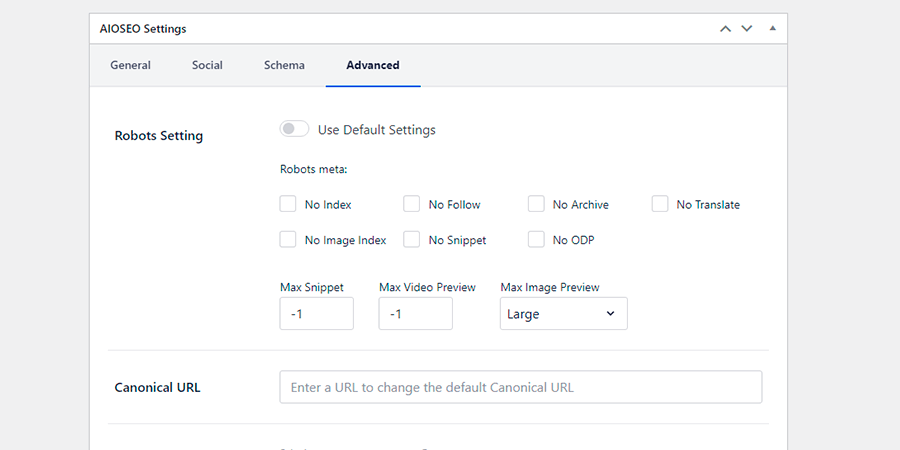
Noindex tags can be easily removed, making this an excellent solution if you want the page to reappear in the index in the future. Note that if you exclude an indexed page with a high rank, there’s no guarantee it will reclaim those positions when the tag is removed.
How to Remove Site Pages Using Yandex Webmaster
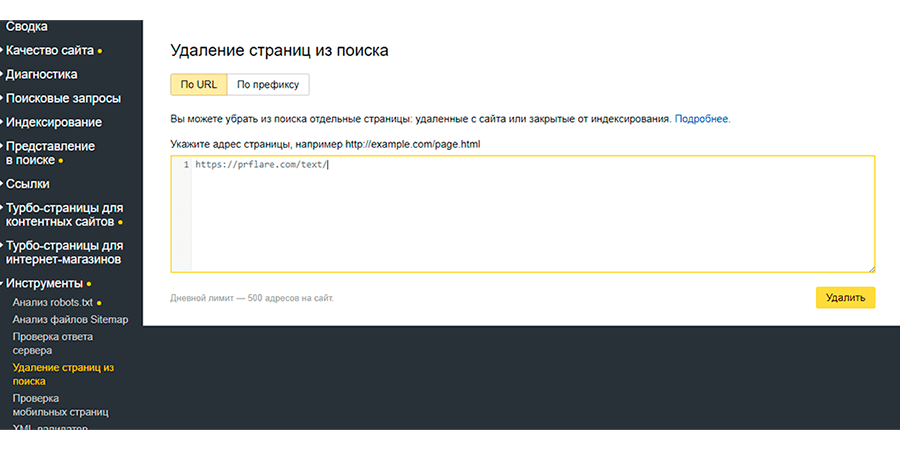
You can remove URLs from Yandex search quickly and easily using the “Delete pages from search” tool. Go to Webmaster, select the site whose page you want to prohibit indexing (or delete from the index), go to Tools (menu on the left), then select “Delete pages from search,” in the newly opened window specify the addresses of the pages (you can submit 500 URLs per day).
To delete a group of pages, use the “By prefix” tab: all pages containing specific parameters in the URL will be deleted. You can delete up to 20 prefixes per day.
How to Remove Pages Using Google Search Console
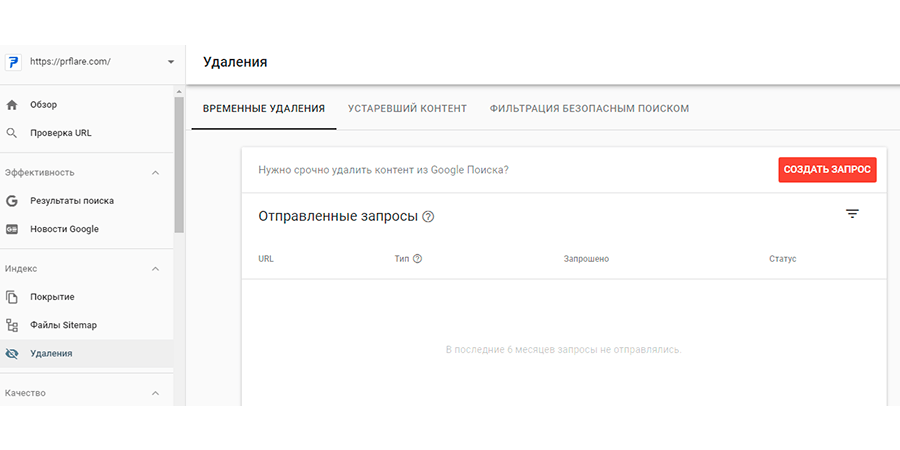
The Google Search Console also has a tool for URL removal. It offers three features:
- Temporarily hide pages from Google.
- Shows which content is not displayed in Google due to being outdated.
- Shows content that Google SafeSearch filters.
Temporary URL Removal
Temporary removal does not delete the page from the index, only blocks its display in search results for about six months.
There are 2 ways to remove a URL:
Temporary removal: removes the page from search results for about six months. You can remove one URL or all URLs that start with a specific prefix.
Remove URL from cache: the cache fragment of the page will be removed from search results until the next indexation.
Note!
Temporary removal is recommended when:
- You quickly want to remove a URL from search results;
- When deleting content from a page and want to remove it from search results, but don’t want the whole page to be deleted.
Do not use temporary removal:
- For permanent removal of a URL;
- To delete content from the Internet (the tool removes content from search results, but the pages will still be in the index).
All requests for removal will be visible in the Search Console for 6 months. You can also cancel a URL removal request.
Removing Outdated Content
Another feature of the tool is to display all requests for removal of outdated content from your site over the past 6 months. Such requests are sent by people who do not own the page when information that no longer exists is displayed in the index results. Approval of such a request will result in the removal of the URL from search results. As before, you can remove a page from search results or cache.
Removal with SafeSearch
SafeSearch is a tool allowing reporting pages with content meant exclusively for adults. Pages reported will be included in the URL removal tool.
301 or 302 Redirect
If production of a particular product is suspended, this option will retain users and direct them to other similar pages, offering another solution. A plus is that the page does not immediately fall out of search results. When production resumes, the redirect can be removed.
This method is suitable for informational resources: if the content has lost its relevance, users can be redirected to other pages that profile the same topic.
Remove a Page from the Resource
A simple and quick solution is complete removal of an unnecessary page from the resource. When the bot accessing the page receives a 404, 403, or 410 HTTP code, it excludes it from the index.
Outdated Pages — When You Can Avoid Deleting Them
Sometimes there are situations when a page is needed periodically. For example:
- seasonal sales,
- regular promotions,
- Black Friday.
The most correct solution would be to keep this page active and place an announcement of the next sale/promotion. The term can be indicated as any. During this sufficiently long period, the page will rank itself high in positions.
Other Methods of Removal (not always effective)
Canonical tags can also be used to remove URLs from search engines, but they are much more useful for eliminating similar content than simply outdated ones. Also, there’s no guarantee that Google will take your canonical tag into account.
You can also use the robots.txt file to stop specific page scanning by search engines, but by itself, this method won’t have the desired effect because Google treats it as a recommendation rather than a rule. If you want the page to be removed from search, you will need to use one of the above-described methods combined with the robots.txt directive.
Conclusion
There are many ways to remove URLs from search engines. Your choice should depend on the value of the content and whether you want the page to be deleted permanently or temporarily. You should also consider the differences between removing content just for search engines and for users. Choose wisely! In any case, before removing content from a search engine index, evaluate its significance and relevance at the moment, think about for how long you wish to do without it.
Note! If you notice that the page you removed still appears in search results, do not panic; maybe the Google and Yandex robots haven’t visited your site yet. The changes made won’t be visible immediately; the process may take several weeks.