
What Are Server Responses and What Types Are There



When a search engine checks a web resource, it first looks at the server response code before getting to the site content. It is crucial to know what responses your pages are issuing and how to verify this. Next, we will talk about these codes and look at the most common errors.
“Server Response Code”: What Is It
A server response code is a three-digit number followed by a text in English. The server issues the number upon a visitor’s request, after which the necessary document is processed. The English explanation is a brief instruction on further actions for the visitor. Such response codes are checked by both browsers and search engines.
How to Check Server Response Code
In Google Chrome, you can perform a check as follows:
- click on the Network tab on the developer panel;
- then refresh the page.
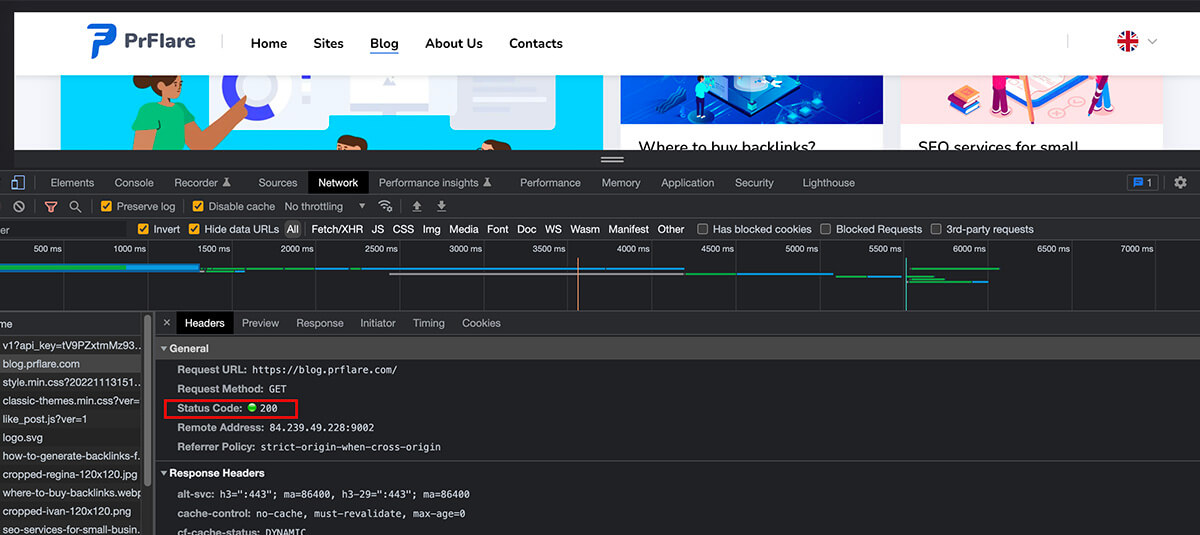
If you need to check a large number of pages at once, you can use the following tools:
- Urlitor;
- Screaming Frog.
“Status Classes” – What Are They
Status classes are groups of codes combined by common characteristics. You can identify the class by the first digit. The following classes exist:
- 1xx – Informational codes (responsible for the data transmission process and are temporary);
- 2xx – Successful processing (the request was successfully received and processed);
- 3xx – Redirection (such requests indicate that further actions are required for the request to be completed);
- 4xx – User error (the request cannot be completed due to a fault of the site owner or user);
- 5xx – Server error (the user did everything correctly, but the server cannot fulfill the request. There is always a server message indicating why it cannot handle the request).
Basic Server Responses
200 OK
This is one of the most common and important statuses. 200 OK indicates that our request was completed successfully, all pages exist, and are available for viewing. This is the code that should be issued by all the pages we want to see in the search engine index.
301 Moved Permanently
Such a code indicates that the page has been permanently moved to another address.
302 Found
This code indicates that the document has been temporarily moved. You should not remove such a page.
304 Not Modified
This code plays an important role in data transmission and server load. If no changes have occurred in the document since the last update, then the server returns code 304 Not Modified. In this case, the search engine can avoid reloading the document since nothing has changed since its last visit.
403 Forbidden
Indicates that access is denied. This response is returned if a user is denied access to the requested document. This can happen when, for example, attempts are made to enter from prohibited IP addresses.
404 Not Found
Almost every user has faced this error at least once. This code indicates that the page does not exist. It should be issued when trying to access non-existent pages. If the page existed but was later deleted, use code 410.
410 Gone
This code means that the page has been permanently deleted. Although 404 and 410 both indicate that a page does not exist, there are differences in their processing. With code 404, the search engine robot will keep returning and rechecking it. A page with code 410 will be marked as permanently deleted and won’t be checked again.
451 Unavailable For Legal Reasons
This code is a more specific version of code 403. It indicates that access to the page is closed at the state level or by court decision due to copyright violations. This type of error is increasingly common.
500 Internal Server Error
This code indicates an internal server error not described in other errors of this class. It occurs when the server encounters a problem that prevents fulfilling the request.
503 Service Unavailable
This code indicates that the server is temporarily unable to process requests due to technical reasons. We might see this response when the server is faced with a large number of requests and simply cannot handle them.
504 Gateway Timeout
This code indicates that the gateway is not responding. If the server is operating as a proxy and did not receive a response from the upstream server to complete the request, we will see this error.
Conclusion on Server Responses
Server response codes are checked by both search engines and browsers. The search engine robot first addresses the response code before proceeding to the content of the web resource.
There are 5 classes of statuses indicating different stages of the data transmission process:
- Informational codes;
- Successful processing;
- Redirection;
- User error;
- Server error.
All pages that we want to see in the search engine indexes should issue code 200 OK.
Correct distribution of server responses helps the search engine retrieve only the necessary information, allowing for saving on crawling budget. That is why it is crucial not to neglect checking your site’s pages.


