
What is Google Discover and How to Get Traffic from It



You likely encounter and even use Google Discover frequently, even if you’re not entirely sure what it is. Every SEO specialist should know about this important tool and be able to work with it. Today, we’ll explain what Google Discover is, how to get featured on it, and how you can utilize it to drive traffic to your site.
Google Discover: Its Essence and Importance
Google Discover is a personalized feed generated based on a user’s activity and behaviors on the web. This ensures that the feed displays only relevant and interesting content for the user, allowing them to discover content without having to input search queries. This feed is only available on mobile devices using the Chrome browser.

Material Selection for Discover Feed is Achieved by Two Mechanisms:
- Google News artificial intelligence;
- Subject relevance within the Knowledge Graph.
These allow the search engine to better understand user needs, displaying the latest news explored from various perspectives.
Feedback is also considered. The search system may ask if the information was useful, and you can indicate if the news is uninteresting directly in the settings.
Content for Google Discover
Google Discover can significantly boost your traffic. When your site gets featured in Google Recommendations, it can result in thousands of clicks in a single day. Thus, Google Discover heavily influences optimization and analytical metrics.
News, informational and entertainment blog articles, sports topics, and content on events and hobbies frequently appear in the Recommendations. In contrast, job postings, petitions, and satirical content are rare.
When Selecting Recommendations, Google Discover Considers the Following User Behaviors:
- Location;
- Search history;
- Subscriptions to or unsubscriptions from certain resources;
- Information entered during registration.
- Google also considers various publication parameters:
- Type of content;
- Loading speed;
- Mobile optimization;
- Clickbait or concise headline;
- Quality of the main image.
How to Get Featured in Google Discover
You can appear in Google Discover by working diligently on your content. It needs to meet the following parameters:
- Uniqueness;
- Loading speed;
- Expertise;
- Credibility;
- No errors;
- Proper grammar;
- Structured layout;
- Author attribution, etc.
Besides creating great content, you should also strive to spark user interest, which can be achieved through:
- Choosing relevant and interesting topics;
- Using catchy headlines;
- Updating obsolete materials;
- Embedding images and videos;
- Avoiding publication of unverified information.
By meeting the aforementioned requirements, your site may be able to feature in Google Discover and receive more traffic. We’ll discuss traffic acquisition methods in more detail.
How to Get Traffic from Google Discover
Optimizing Content for Mobile Devices
Since Google Discover is displayed only on mobile devices, this is the most crucial starting point. Use Search Console to check your site for any display errors on mobile. Additionally, ensure your webpage loads quickly, maintains an optimal number of banners, and contains no pop-up adverts.
Publishing Relevant and Popular Content
Every company knows their target audience, its interests, and needs. Your site’s content should engage your potential clients. Besides that, ensure its uniqueness, authenticity, and relevance. Content like this is more likely to break into Google Discover.
If you find creating quality content challenging, you can utilize auxiliary services such as:
- Serpstat: helps find popular topics in your niche;
- Google Trends: assesses the relevance of your chosen topic;
- Exploding Topics: allows you to find interesting topics for your content.
Using Eye-Catching Images
Text interspersed with images is better received by users than solid blocks of text. Therefore, multimedia should be vibrant and high quality. It’s recommended to use images with a width of at least 1200 px for Google Discover. Such images grab attention; however, you should not use your company logo as the image.
Correct Use of Meta Tags
Title and description meta tags should be used appropriately, not as clickbait or deceptive to users. Such headlines should be credible and concisely reveal the article’s content. Additionally, they should capture attention and evoke interest.
Including YouTube Videos in Content
If you have a YouTube channel, create engaging and informative thematic videos and add them to your publications. Google favors visual information delivery, giving you a good chance of appearing in the recommendation feed. Just remember that when a user clicks on your video, they’ll be redirected to YouTube, not to your actual publication.
Improving E-A-T
The search engine focuses on expertise, authority, and trustworthiness. To improve these metrics, you can:
- Attribute articles to their authors, with the date and publication sources;
- Add more information about the company itself and contact details;
- Use structured data for information systematization;
- Find interesting topics to create your content.
Updating Content
Regularly updating and refreshing your site’s material offers a great chance to appear in Discover. Review all old articles, add updated information, implement changes, and edit meta tags.
Google Knowledge Graph
This knowledge base was created to enhance search quality back in 2012. To verify if your brand is in the Google Knowledge Graph, simply enter its name in the search bar. Being part of the graph allows users to subscribe to your company. The search system then understands what your brand is associated with and displays your content to the target audience.
Ways to Monitor Traffic from Google Discover
Check Discover Traffic in Google Search Console
If you wish to view how much traffic you’ve received from Recommendations, head to Google Search Console. To track traffic, click on Performance and then on Discover. However, this report is only visible if the number of impressions over a year and 4 months reaches a certain threshold.

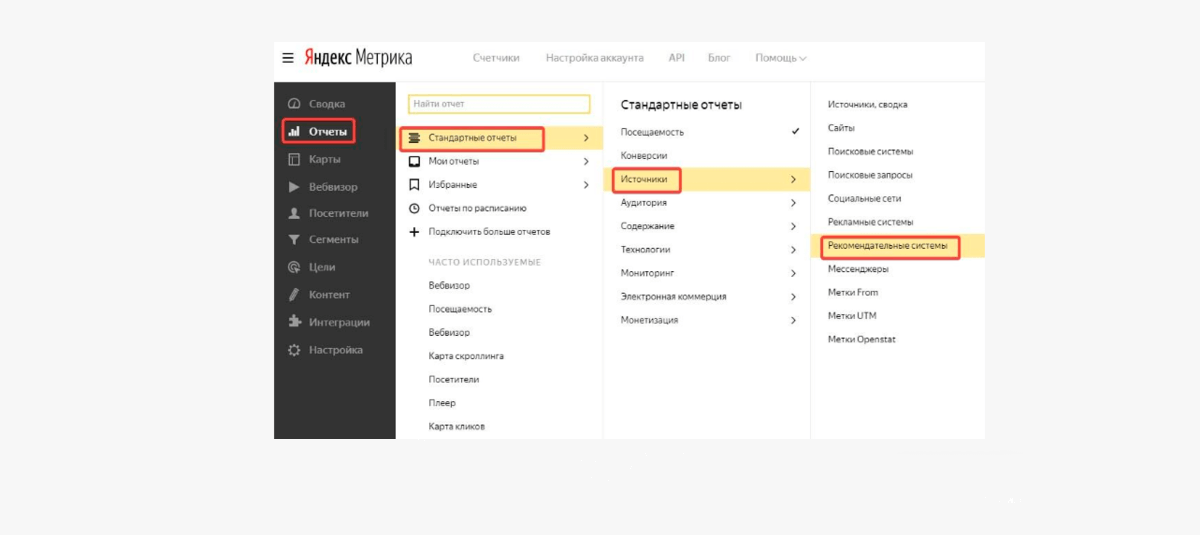
Check Discover Traffic in Yandex.Metrica
To track traffic in Yandex.Metrica, navigate to “Recommendation Systems”. Then, click “Standard Reports”, followed by “Sources”. You can view even small traffic amounts without restrictions.
In Conclusion About Google Discover
Being featured in Google Discover is especially valuable for brands and large companies. Most often seen in Recommendations are news sources, sports news, entertainment content, and hobby topics. To get into Discover, you can:
- Optimize content for mobile devices;
- Create unique and expert content;
- Use meta tags properly;
- Enrich text materials with images and videos;
- Update old content and make it more relevant.
Track traffic from Google Discover using Yandex.Metrica and Google Search Console.